LockTerm puts a macOS‑style Terminal window on your iPhone lock screen. Your day, at a glance, in monospace.
Join the TestFlight beta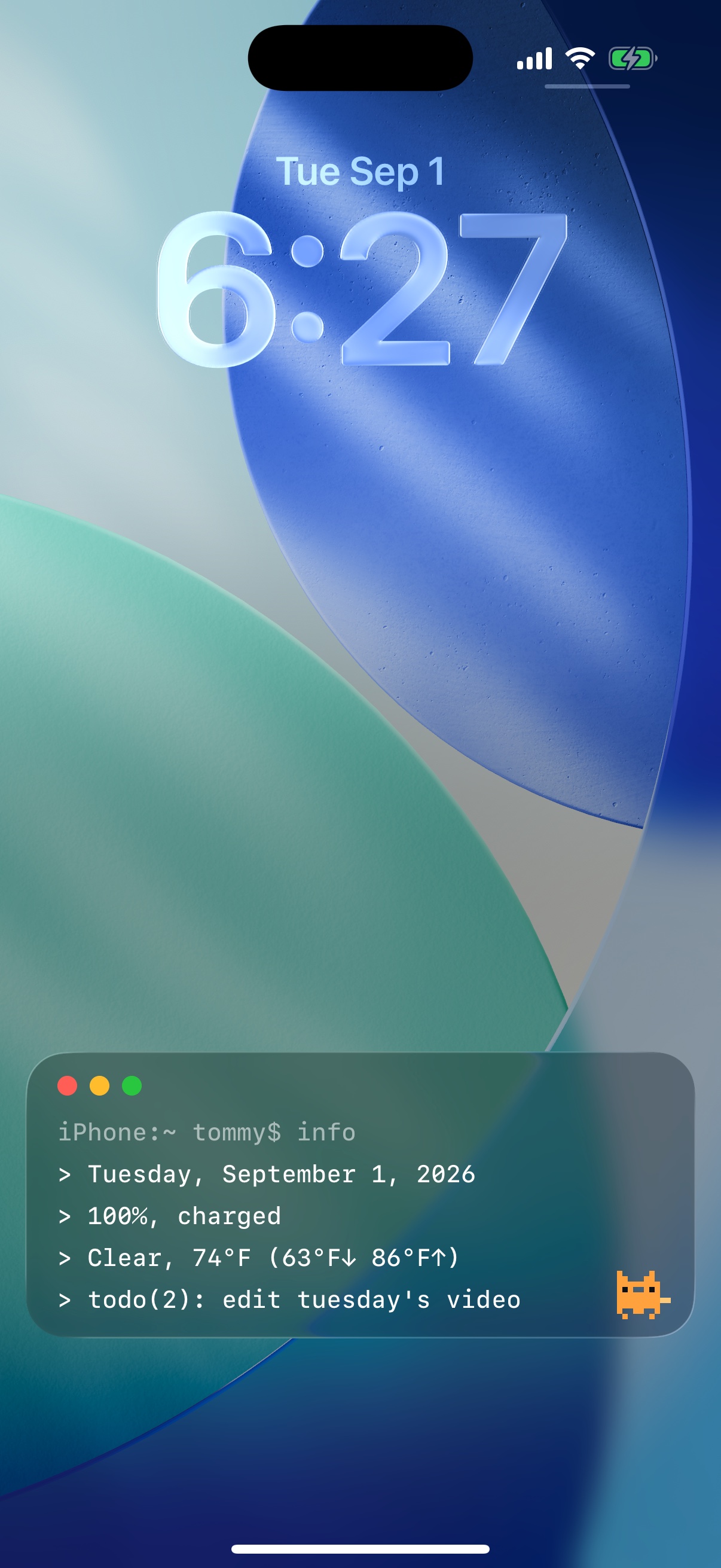
Modules
Turn modules on, drag them into the order you want, and the terminal prints exactly that.
Today's date and your charge state, recomputed every time the lock screen refreshes.
Current conditions with the day's high and low for your city. Fahrenheit or Celsius. No account needed.
Keep a short list in the app, check items off, and see what's next without unlocking.
Your next event, straight from the Calendar app.
Days until launch day, the trip, the deadline. Whatever you're counting down to.
Rotates daily through quotes you add yourself.
Any sentence you want staring back at you every time you pick up your phone.
A tiny cat lives in the corner of the window. He naps at night and does his own thing all day.
A lock screen mini widget and home screen widgets read from the same setup.
How it works
There's no way to draw a box on the iOS lock screen. Except one.
Tap Start Session and LockTerm runs as a Live Activity, the same system Apple uses for ride tracking and sports scores. That's how it gets a full window on the lock screen.
A session lasts up to eight hours. Open the app to refresh it, or just start another one. Your config is remembered.
While a session runs, the prompt and your pixel cat sit in the Dynamic Island, and expand into a mini terminal with a long press.
Themes
Three looks, all monospace. Classic reads like the Mac's Terminal. Phosphor and amber read like the machines it's named after.
Install
LockTerm is in public beta through TestFlight, Apple's official beta app. No sign-up, no waitlist.
Install TestFlight from the App Store if you don't have it. It's free and made by Apple.
On your iPhone, open testflight.apple.com/join/3nJng41w and tap Accept, then Install.
Open LockTerm, pick your modules, tap Start Session, and lock your phone.
Join the beta and help shape what ships to the App Store.
Join the TestFlight beta LockTerm